Search
Chaos Cypher provides three search modes that work across your indexed documents and knowledge graph.
The curl examples on this page use http://localhost:8080, which is the API port for the multi-container development stack. The all-in-one container (the primary install) serves the API on port 80 instead — use http://localhost/api/v1/... there.
Why GraphRAG
Pairing a knowledge graph with vector search beats embeddings alone on multi-hop questions — where the answer comes from connecting several facts, not matching one passage. Independent, peer-reviewed research on the GraphRAG approach finds:
- ~7% higher multi-hop retrieval than a state-of-the-art embedding model — HippoRAG 2, ICML 2025
- ~24% more accurate on complex multi-hop reasoning vs. reranked vector RAG (53% vs 43%) in an independent benchmark — GraphRAG-Bench, ICLR 2026
- 6–13× faster serving than iterative retrieval, at equal-or-better recall — HippoRAG, NeurIPS 2024
These figures are from independent, peer-reviewed research on the GraphRAG approach (linked) — not ChaosCypher benchmarks. GraphRAG's edge is strongest on multi-hop questions; plain vector search is fine for single-fact lookups.
Search Modes
- Web UI
- CLI
- Python
- API
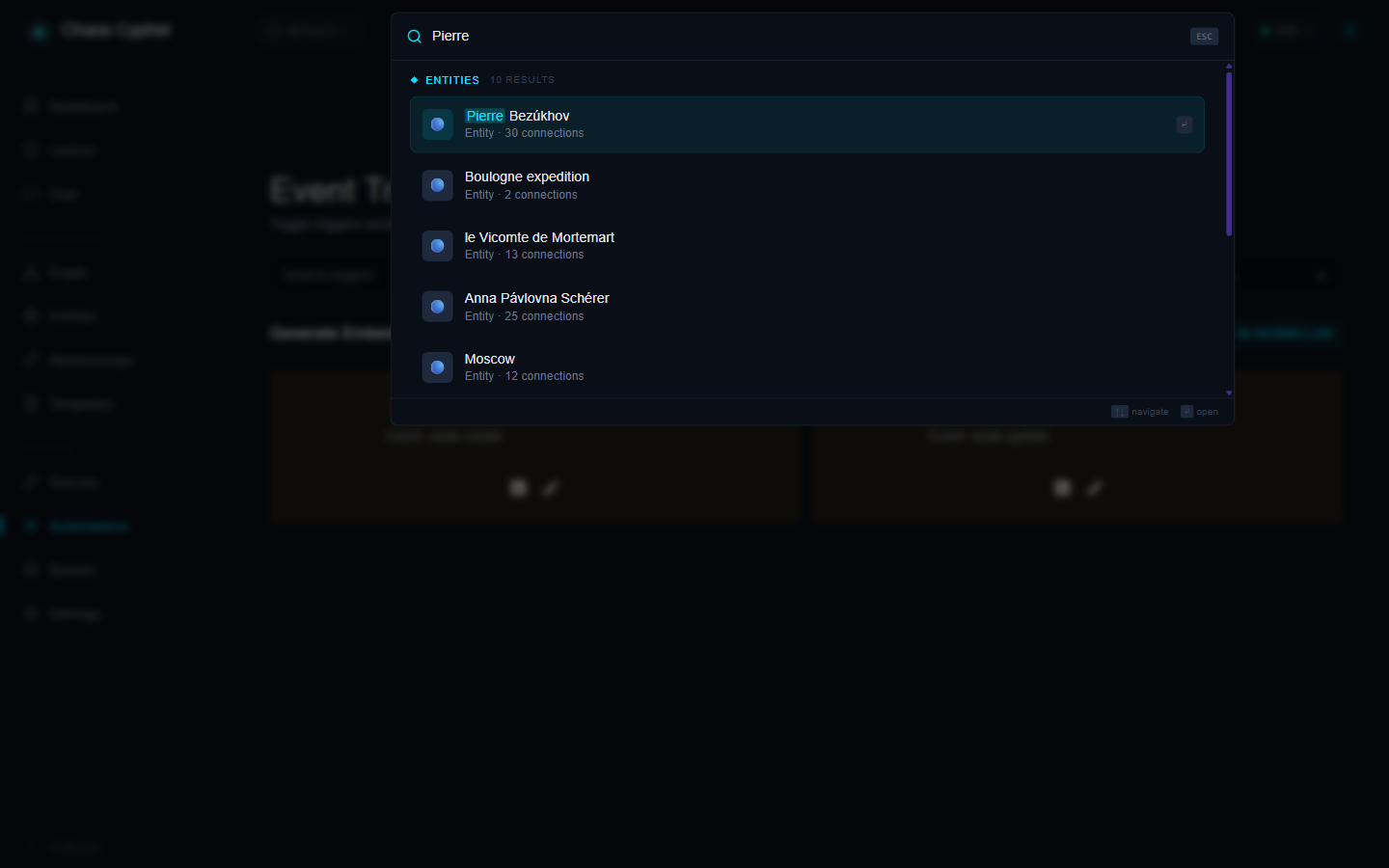
- Press Ctrl+K (or Cmd+K on macOS), or click the search bar at the top of the page
- Type your query — entity matches appear instantly under Entities
- Use the arrow keys (↑ / ↓) to highlight a result and Enter to open it, or click any row
- Press Esc to dismiss the palette
The palette is also a command launcher — start with
>for commands or/to send the query straight to chat.
# Hybrid search (default)
chaoscypher source search "machine learning algorithms"

# Keyword search (fast, no LLM needed)
chaoscypher source search "machine learning" --mode keyword

# Semantic search (vector similarity)
chaoscypher source search "artificial intelligence applications" --mode semantic

# Limit results
chaoscypher source search "neural networks" --limit 5
import asyncio
from chaoscypher_core import Engine

async def main():
    async with Engine("./data/databases/default") as engine:
        # Hybrid search (default)
        results = await engine.search("machine learning algorithms")
        for r in results:
            print(f"{r.score:.3f}  {r.label}")

asyncio.run(main())
# Keyword search
curl "http://localhost:8080/api/v1/search?q=machine+learning&search_type=keyword"

# Semantic search
curl "http://localhost:8080/api/v1/search?q=artificial+intelligence&search_type=semantic"

# Hybrid search
curl "http://localhost:8080/api/v1/search?q=neural+networks&search_type=hybrid"
Keyword Search
Traditional full-text search using SQLite FTS. Matches exact terms and phrases in document chunks.
Best for: finding specific terms, names, or exact phrases.
Semantic Search
Vector similarity search using embeddings. Finds content that is semantically similar to your query, even without exact word matches.
Best for: conceptual queries, finding related content, when you don't know the exact terminology.
Hybrid Search
Runs keyword and semantic search together and merges the results — semantic matches must exceed the minimum similarity threshold (default: 0.55) to be included, and each result keeps the higher of its two scores. Very short queries (under 3 characters) use keyword search only.
Best for: general-purpose search that combines both approaches.
GraphRAG Search
Graph-enhanced retrieval that fuses knowledge graph traversal with vector search. When a question involves connections across multiple documents or entities, GraphRAG finds answers that pure vector search misses.
How it works:
- Extracts entities from your query
- Finds matching nodes in the knowledge graph
- Traverses graph relationships using Personalized PageRank
- Retrieves provenance-linked document chunks
- Fuses graph and vector results using Reciprocal Rank Fusion
GraphRAG is available as the graphrag_search tool in AI chat and as an MCP tool. The chat system automatically prioritizes GraphRAG when your database has a knowledge graph with extracted entities.
Seeing what GraphRAG retrieved: in the web chat, every answer that used tools shows a Tool Activity panel beneath it. Expand the graphrag_search entry to inspect its input and full result, including retrieval_stats — the retrieval mode (full_graphrag, vector_only, or keyword_only), seed entities found, PageRank entities explored, and provenance/vector chunk counts. A mode of vector_only usually means no graph entities matched the query (for example, when extraction hasn't run yet).
Best for: multi-hop questions, finding connections across documents, questions that span multiple topics or entities.
Search Results
Results come in two types:
Chunk Results
Matches from document source chunks. Each result includes:
| Field | Description |
|---|---|
| content | The matching text passage |
| score | Relevance score |
| filename | Source document name |
| page_number | Page location (when available) |
| section | Section heading (when available) |
| source_id | Link back to the source document |
Node Results
Matches from knowledge graph nodes. Each result includes:
| Field | Description |
|---|---|
| label | Entity name |
| score | Relevance score |
| template_id | Entity type |
| properties | Entity properties |
Embeddings
Vector embeddings are generated locally on the CPU using sentence-transformers. No LLM provider or API key is needed for embeddings — they run entirely offline after the initial model download.
The default model is Qwen3 Embedding 0.6B (1024 dimensions). You can change the model in settings.yaml:
embedding:
  model: Qwen/Qwen3-Embedding-0.6B

search:
  vector_dimensions: 1024
The model downloads automatically on first use and is cached locally.
Configuration
Key search settings in settings.yaml:
embedding:
  model: Qwen/Qwen3-Embedding-0.6B

search:
  enable_vector_search: true
  vector_dimensions: 1024
  min_similarity_threshold: 0.55
  max_search_results: 100
  enable_rerank: true
  rerank_model_name: Alibaba-NLP/gte-reranker-modernbert-base
GraphRAG Tuning
Six parameters in the graphrag section of settings.yaml control the GraphRAG pipeline. The defaults were chosen from the GraphRAG literature and testing across database sizes — most users never need to change them.
| Setting | Default | Description |
|---|---|---|
seed_similarity_threshold | 0.3 | Minimum cosine similarity for a graph entity to qualify as a PageRank seed. Lower values cast a wider net but may introduce noise. |
ppr_top_k | 20 | Number of top-scoring entities from Personalized PageRank to include in graph context. Higher values give the LLM more structural context at the cost of token budget. |
ppr_damping | 0.85 | PageRank damping factor. Higher means more exploration away from seeds; lower keeps results closer to directly matched entities. |
max_triples | 200 | Maximum relationship triples included in the graph context summary. Capped to avoid flooding the LLM context window. |
vector_overfetch_multiplier | 3 | When searching for seed entities, fetch this multiple of the seed limit from the vector index to account for non-entity results that need filtering. |
max_graph_nodes | 50000 | Safety limit. If the graph exceeds this, PageRank is skipped (too expensive) and search falls back to vector-only mode. |
One related cap lives outside the graphrag section: batching.graphrag_edge_query_limit (default 50) limits how many edges per direction are loaded for each top-ranked entity when assembling the graph context.
Re-ranking
When enabled, search results are re-ranked using a cross-encoder model for improved relevance. The re-ranker evaluates each result against your query and reorders them by true relevance rather than raw similarity scores. Chaos Cypher defaults to Alibaba-NLP/gte-reranker-modernbert-base, a ModernBERT-based cross-encoder (149M params, ~600MB) that scores ~56.2 NDCG@10 on the BEIR benchmark. Any HuggingFace cross-encoder model can be used via the rerank_model_name setting.
| Setting | Default | Description |
|---|---|---|
enable_rerank | true | Enable cross-encoder re-ranking |
rerank_model_name | Alibaba-NLP/gte-reranker-modernbert-base | HuggingFace cross-encoder model for re-ranking |
rerank_candidate_multiplier | 3 | Fetch 3x candidates before re-ranking |
rerank_min_candidates | 15 | Minimum candidates to consider |
Index Management
Rebuild Indexes
If search results seem stale or incomplete, rebuild the indexes:
- Web UI
- CLI
- API
Go to Settings → Search and click Rebuild Search Indexes.
chaoscypher source rebuild-search
# or for a specific database
chaoscypher source rebuild-search --database my-project
The command auto-detects whether embeddings need regeneration: if the embedding model or dimensions changed, it regenerates all embeddings (slower); otherwise it rebuilds the indexes from stored embeddings (fast).
curl -X POST http://localhost:8080/api/v1/search/indexes
This rebuilds the fulltext (keyword) and vector (sqlite-vec) indexes from all nodes, and re-indexes all document chunk embeddings.
Generate Missing Embeddings
Generate vector embeddings for nodes that don't have them:
- Web UI
- CLI
- API
Go to Settings → Search and click Rebuild Search Indexes — it auto-detects missing or mismatched embeddings and regenerates them in the background.
Embedding generation is available via the API.
curl -X POST http://localhost:8080/api/v1/search/embeddings
This runs as a background job via the LLM queue.
Index Statistics
Check the current state of your search indexes:
- Web UI
- CLI
- API
Search statistics are displayed in Settings → Search.
Index statistics are available via the API.
curl http://localhost:8080/api/v1/search/stats
Returns: fulltext document count, vector index size, and vector dimensions.
See also
- Architecture: Indexing & Embeddings — how FTS5 and sqlite-vec indices are built, embedding storage format, and hybrid search internals
- API reference: Search — endpoint details for keyword, semantic, and hybrid search queries; index rebuild and embedding generation endpoints