Databases
Chaos Cypher supports multiple isolated databases, each containing its own sources, knowledge graph, chat history, search indexes, and configuration.
Multi-Database Architecture
Each database is a self-contained directory with:
databases/{name}/
└── app.db          # All data: sources, chats, workflows, graph, search indices (SQLite default)
The storage backend is pluggable via Core's hexagonal architecture: any class implementing the storage protocols in chaoscypher_core.ports can replace the default SQLite adapter.
Databases are completely isolated — switching databases loads an entirely different set of data.
Managing Databases
List Databases
View all available databases with their size and last modified date:
- Web UI
- CLI
- API
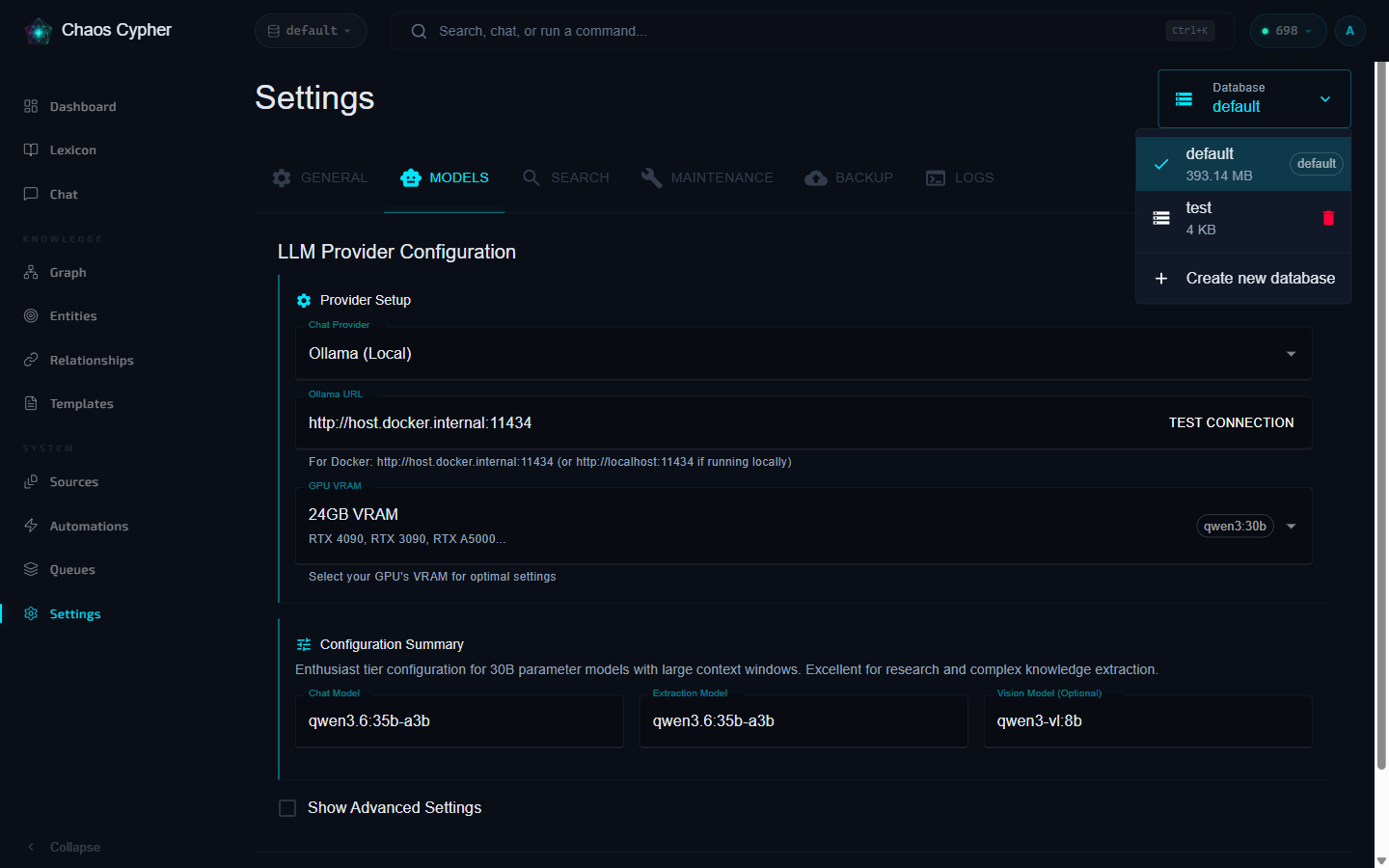
Go to Settings → Databases to see all databases with their size, last modified date, and active status.
chaoscypher db list
                  Databases
┏━━━━━━━━━━━━━━━━┳━━━━━━━━━┳━━━━━━━━━━━━━━━━━━━━━┳━━━━━━━━━┓
┃ Name           ┃    Size ┃ Modified            ┃ Status  ┃
┡━━━━━━━━━━━━━━━━╇━━━━━━━━━╇━━━━━━━━━━━━━━━━━━━━━╇━━━━━━━━━┩
│ default        │ 2.3 MB  │ 2026-03-09 14:22:01 │ current │
│ research-2026  │ 8.7 MB  │ 2026-03-08 10:15:43 │         │
└────────────────┴─────────┴─────────────────────┴─────────┘
curl http://localhost:8080/api/v1/databases
Current Database
Check which database is active:
- Web UI
- CLI
- API
The current database name is displayed in the header/navigation bar. You can also quickly switch databases from the sidebar dropdown without navigating to the Settings page.
chaoscypher db current
curl http://localhost:8080/api/v1/databases/current
Create a Database
- Web UI
- CLI
- Python
- API
- Go to Settings → Databases
- Click Create Database
- Enter a name (alphanumeric, hyphens, and underscores allowed)
chaoscypher db create research-project
Creating database 'research-project'...

Created database 'research-project'
  Location: ~/.local/share/chaoscypher/databases/research-project

Switch to it with: chaoscypher db switch research-project
from chaoscypher_core import Engine

# Creating an Engine with a new database path initializes it automatically
with Engine("./data/databases/research-project") as engine:
    stats = engine.get_stats()
    print(f"New database: {stats.nodes} nodes")
curl -X POST http://localhost:8080/api/v1/databases \
  -H "Content-Type: application/json" \
  -d '{"name": "research-project"}'
New databases are automatically initialized with the required directory structure and a fresh database.
Switch Database
- Web UI
- CLI
- API
Click on a database name in Settings → Databases to switch to it. The UI refreshes to load the new context.
chaoscypher db switch research-project
curl -X PATCH http://localhost:8080/api/v1/databases/current \
  -H "Content-Type: application/json" \
  -d '{"name": "research-project"}'
After switching databases, the web UI refreshes to load the new context. All subsequent API calls operate on the new database.
Delete a Database
- Web UI
- CLI
- API
Click the delete button next to a database in Settings → Databases and confirm the deletion.
# Delete with confirmation prompt
chaoscypher db delete research-project

# Skip confirmation
chaoscypher db delete research-project --yes
curl -X DELETE http://localhost:8080/api/v1/databases/research-project
- You cannot delete the currently active database
- You cannot delete the
defaultdatabase - Deletion is permanent and removes all data
What's Isolated
| Data | Isolated per database |
|---|---|
| Sources and document chunks | Yes |
| Knowledge graph (nodes, edges, templates) | Yes |
| Chat conversations and messages | Yes |
| Search indexes (fulltext + vector) | Yes |
| Workflows and triggers | Yes |
| Tool registry | Yes |
| Quality scores | Yes |
| Tags | Yes |
Backup & Restore
Chaos Cypher includes built-in database backup and restore from the Settings > Backup tab:
- Create backups — Snapshot the current database to a timestamped backup file
- Scheduled backups — Configure automatic backups on a schedule
- Restore — Restore a database from a previous backup
- Download — Download backup files for offline storage
- Manage — View, download, or delete existing backups
Backups capture the full database state including sources, knowledge graph, chat history, and search indexes.
Use Cases
- Project separation — Keep different research projects in separate databases
- Domain isolation — Separate databases for different knowledge domains
- Testing — Create a test database without affecting production data
- Snapshots — Create a new database, import a CCX package, and explore without modifying the original